
 By PrestaTips
You launch an online store and PrestaShop is your chosen solution. But one question persists: should you install the latest version of the software, or opt for the penultimate, more proven one? This choice is not anecdotal: it impacts the stability of your store, its scalability, and even your budget in the medium term. Here’s how to decide based on your priorities.
The latest version: a bet on the future?
The advantages for a new project
- Up-to-date technologies : Take advantage of the latest improvements in performance, safety and ergonomics. For example, better cache management or built-in SEO tools can save you valuable time.
- Long term support : By starting with the latest version, you will delay the next major migration, limiting future technical costs.
- Compatibility with new modules : Module and theme developers often prioritize compatibility with the most recent version.
Points of vigilance
- Residual bugs : Even if PrestaShop tests its versions, some bugs are only detected after the massive deployment. If your launch is imminent, this may pose a risk.
- Less field feedback : There are fewer tutorials, forums and problem solutions than with an older version.
The penultimate version: the wisdom of experience?
Why some remain loyal to him
- Proven stability : Major bugs have been fixed, and the community has had time to document solutions to common issues.
- Wide compatibility : Most modules and themes are optimized for this version, which reduces the risk of technical conflicts.
- Fewer surprises : If you have a tight schedule, avoiding the hazards associated with a freshly released version can be an asset.
Disadvantages to consider
- Limited time support : PrestaShop focuses its efforts on the latest versions. Eventually, you will have to migrate, which may incur additional costs.
- Late features : Some improvements (like conversion or analytics tools) will not be available, which may put you at a competitive disadvantage.
How to choose? A clear decision grid
To help you decide, here are the criteria to evaluate based on your project:
| Criterion | Latest version | Penultimate version |
|---|---|---|
| Stability | Risk of residual bugs | Stability confirmed by the community |
| Features | Access to the latest innovations | Proven features, but less recent |
| Module compatibility | To check (some modules may be slow) | Wide choice of compatible modules |
| Technical support | Priority (quick fixes) | Less priority, but rich documentation |
| Budget | Potential costs linked to possible bugs | Cost associated with migration once the version is obsolete |
The Prestashop update cycle
It is very important to understand how versions are handled. Here is the graph found on Prestashop Project:
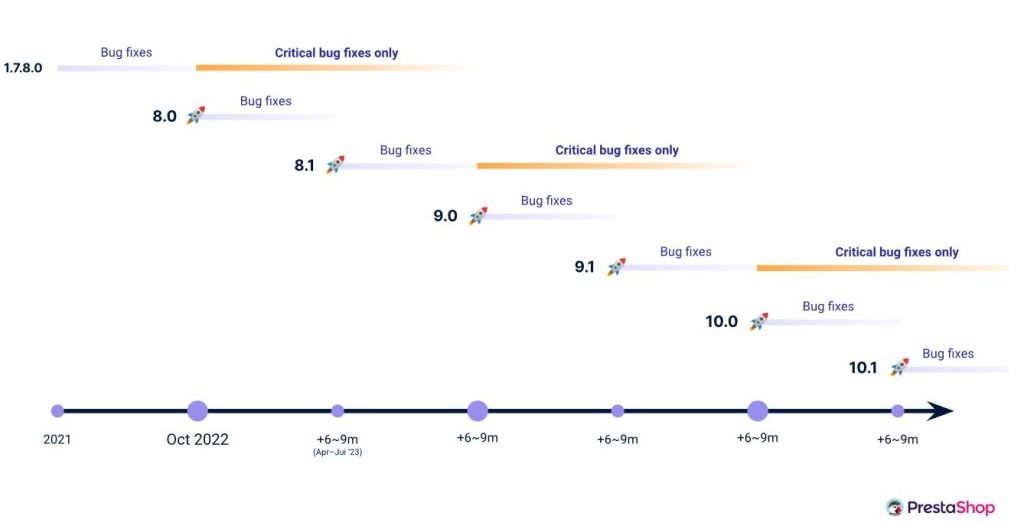
We see here that each major version lasts approximately 3 years.
So it is obvious which to choose between one Prestashop 8.2 already proven and one Prestashop 9 released 2 days ago is not the same as choosing between one Prestashop 8.2 at the end of life and one Prestashop 9 released 6 months ago
Recommendations by project profile
- You are launching a store and want to put few modules → Opt for the latest version. You will then have time to expand your store as needed.
- Your project is ambitious, with specific technical needs (e.g. complex integrations) → Choose the latest version to benefit from the latest advances, but be aware that some modules may not work. It’s up to you to make a list of what you absolutely need and choose accordingly.
- You are not sure of your technical needs → Consult a PrestaShop expert to assess the compatibility of your modules/themes with each version.
Concrete steps to get started
- List your needs : What features are essential for your store? (eg: inventory management, marketing tools, etc.)
- Check compatibility : Contact the editors of your favorite modules/themes to confirm their support.
- Test in a staging environment : Install the chosen version on a test server to validate its behavior with your configuration.
- Allow room for maneuver : Whatever your choice, anticipate a budget for possible adaptations.
6. Resources to go further
- Official PrestaShop roadmap : To find out about planned developments.
- PrestaShop Addons : Check module compatibility with each version.
- PrestaShop community (Slack, forums) : To exchange with other e-retailers.