
 By PrestaTips
The identity of your site is very important. It is in this context that choosing the right image that appears on the tab is essential. Don’t neglect it and follow the guide !
Dimension of the favicon
Even if the icon appears small, it is generally recommended to put an image (square format) of 512×512 pixels. For what? Because when we open certain browsers, we find ourselves faced with this:
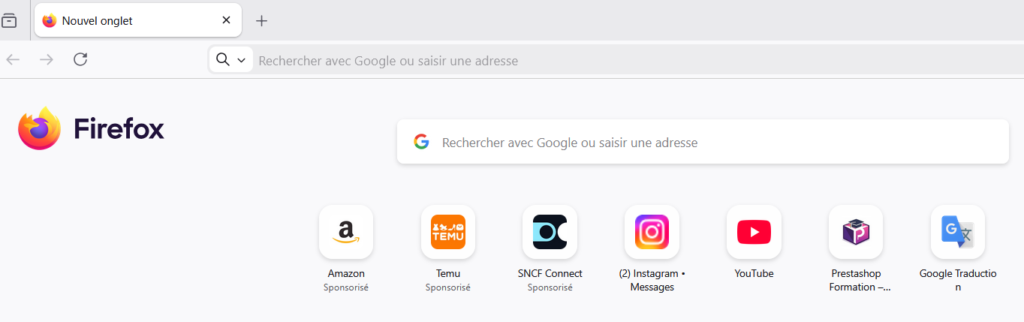
In this display, the icon appears larger than on the tab. This is the whole point of putting a favicon at 512×512 pixels.
Favicon format? JPG? PNG? Ico?
ICO is the historical and universally recognized format for favicons. All browsers (Chrome, Firefox, Edge, Safari, etc.) support it without problem even for older versions. An ICO file can contain multiple icon sizes (16×16, 32×32, 48×48, etc.) in a single file. This allows the browser or operating system to automatically choose the most suitable size for the display.
PNG and JPG are also widely supported, but some browsers or systems may exhibit unexpected behavior with non-ICO formats.
| Criterion | ICO | PNG/JPG |
|---|---|---|
| Compatibility | ✅ Universal | ⚠️ Variable |
| Multi-resolution | ✅ Integrated | ❌ Separated |
| Transparency | ✅ Yes | ⚠️ PNG only |
| Quality | ✅ Without loss | ⚠️ JPG with loss |
For Prestashop the final format will always be *.ico
So try loading a file directly PNG/JPG in Prestashop, conversion should be automatic. If that doesn’t work, you can always use the official Prestashop converter at this address:
https://addons.prestashop.com/en/create-favicon.php?pab=1
You should now have a nice icon on the tabs, as well as in the results Google and other search engines.