
 By PrestaTips
Changing host, switching to a new CMS or simply refreshing your infrastructure can quickly become a headache. Between the risks of data loss, unplanned downtime and incompatibilities, migrating a website is never a step to take lightly. However, with the right tools, this operation can be as simple as a well-organized move.
Among the solutions available, MigrationPro Ultimate stands out for its robustness and flexibility. But how does it differ from a tool like 1-Click Migrate ? And how does its methodology work to ensure a smooth transition? Here’s what you need to know.
MigrationPro vs 1-Click Migrate: two approaches, the same objective?
At first glance, 1-Click Migrate and MigrationPro Ultimate promise the same thing: moving a site from point A to point B effortlessly. Yet their philosophies and abilities differ profoundly.
1-Click Migrate: simplicity at all costs
As the name suggests, 1-Click Migrate focus on speed. With one click, the tool copies the files and database to the new environment. This is ideal for small sites or basic migrations, where the structure is simple and the risks minimal.
But be careful : this simplicity comes at a price. Complex migrations (multilingual sites, large databases, custom configurations) may encounter limitations. Without fine control, errors are more difficult to anticipate, and post-migration adjustments are often necessary.
MigrationPro Ultimate: precision above all
Where 1-Click Migrate acts like an express mover, MigrationPro Ultimate behaves like an architect. It doesn’t just copy and paste: it analyzes, adapts and optimizes each element of the site before, during and after migration.
Why this difference? MigrationPro is not limited to a raw copy. It takes into account:
- Technical specifications : PHP versions, extensions, dependencies.
- Sensitive data : redirects, SEO metadata, server configurations.
- Pre-migration tests : checking for incompatibilities before even starting the transfer.
Comparative table
1-Click Migrate vs MigrationPro Ultimate
| Criterion | 1-Click Migrate | MigrationPro Ultimate |
|---|---|---|
| Complexity managed | Simple sites | Complex, multilingual sites |
| Control | Automatic, not very flexible | Configurable, pre-migration tests |
| Downtime | Possible | Minimized (background migration) |
| Database support | Basic | Advanced (optimization, cleaning) |
| Technical adaptation | None | Version management, extensions, dependencies |
| Post-migration | Manual checks | Detailed reports, automatic corrections |
In summary If 1-Click Migrate suitable for a standard blog or showcase site, MigrationPro Ultimate is essential as soon as migration involves technical or strategic issues.
The MigrationPro methodology: a 3-step migration
MigrationPro doesn’t just move files. He follows one structured methodology, inspired by the best practices of web infrastructure experts. Here’s how it translates into practice:
1. Analysis: understand before acting
Before any operation, MigrationPro scans the source site to identify:
- Dependencies : What versions of PHP, MySQL or Apache are used?
- Extensions : which plugins, modules or libraries are critical?
- Sensitive data : which database tables contain vital information (users, commands, etc.)?
This step allows you to mapping risks and adapt the migration to the specificities of the project.
2. Migration: an intelligent transfer
Unlike a raw copy, MigrationPro:
- Adapts the data : conversion of encodings, optimization of SQL queries, management of relative/absolute paths.
- Simulates the target environment : Before the final transfer, the tool checks that everything will work correctly on the new server.
- Minimizes downtime : Thanks to incremental synchronization, the site remains accessible during the majority of the process.
3. Validation: nothing is left to chance
Once the migration is complete, Migrationpro generate one detailed report :
- Checking internal and external links.
- Testing critical features (shopping cart, contact form, etc.).
- Comparison of performance before/after migration.
Result : a migration not only successful, but optimized for the new environment.
Why choose MigrationPro Ultimate?
- For professionals : time savings, risk reduction, and the ability to manage complex projects without extensive technical expertise.
- For agencies : a tool that integrates into a quality workflow, with clear reports to present to customers.
- For e-retailers : the guarantee that customer data and transactions will not be compromised.
Installation and configuration
1/ Install Migrationpro on the target site (the new site)
2/ Install the connector on the old site
Migration pro offers you a download link for the “Prestashop Connector”, this is what you need to install on the old site:

3/ Show information on the old site and copy the information
Once done, launch the connector on the old site, it displays this window:
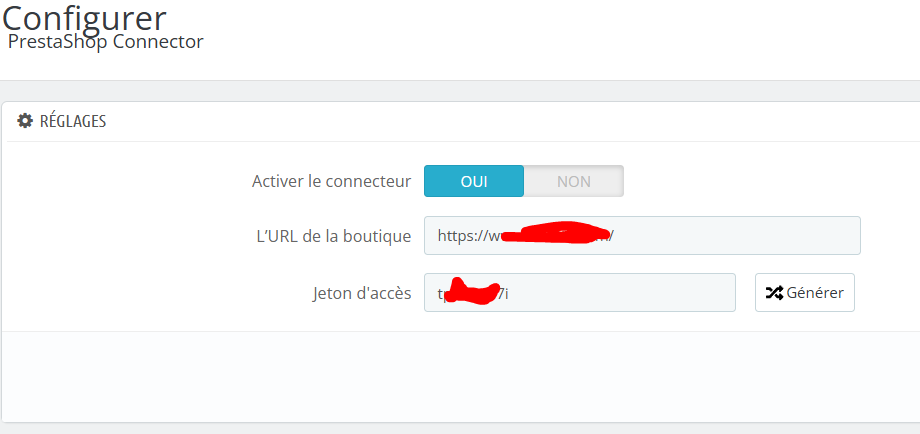
Copy EXACTLY the same information (URL and tokens) on the new site:
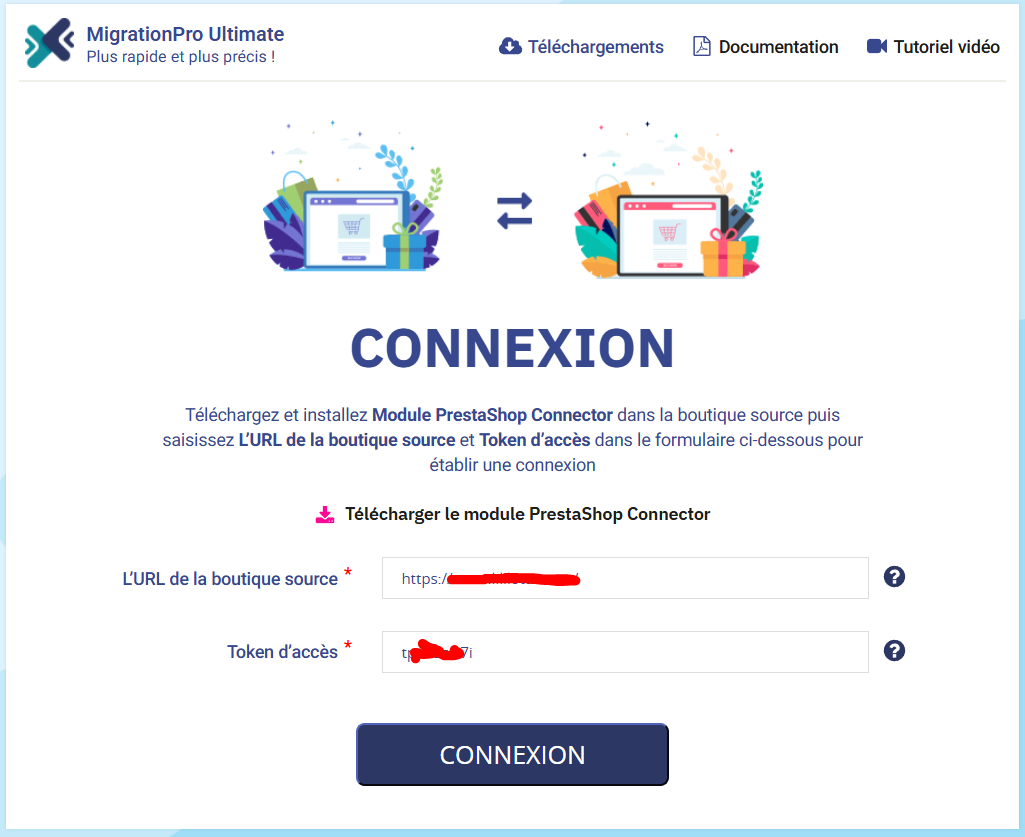
Once the information is filled in, click on “Login”, you see this window:
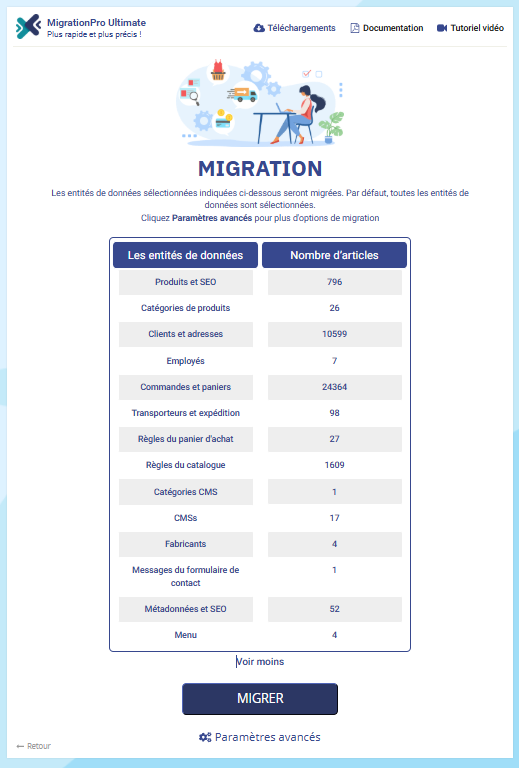
In 98% of cases you will just have to click on “Migrate“to continue. I still draw your attention to “Advanced settings“which will allow you to modify the type of migration (example: updated after making a first migration), or the number of requests (depending on the speed of your hosting).
If everything is good you will have this window:

In conclusion: a migration, yes, but not just any way
Migrating a site is a bit like moving a business: you don’t just put everything in boxes. It’s necessary anticipate, organize and validate every step. MigrationPro Ultimate is the tool that transforms this operation into a controlled process, where every detail counts.
Are you considering a migration? Think of it like an investment: choosing the right method today means avoiding unpleasant surprises tomorrow.
And you, what was your experience with site migrations? Has a particular tool had an impact on you (for good or bad)?